The Calculation Definitions window defines periodic workflows, schemes to use for calculating portfolio figures, Portfolio Calculation template to use for Portfolios, Portfolio Groups and Calculation Segments. A need to set up individual Calculation Definitions per portfolio, portfolio group or calculation segment arises e.g. when Portfolio Service Costs Setups have individual parameters, rather than having Cost Setups being valid for larger groups of portfolios.
As of version 26.01, you can import data via Data Format Setups to the Calculation Definitions window by using the BASE_2505 base filter.
Benefits
Supports importing of larger numbers of individual Calculation Definitions
Enables process automation of integrating new portfolios
Subscription based licensing
Investment Accounting Manager
Sales module dependency
Investment Accounting Manager
Distinguish between internal and external fund certificates
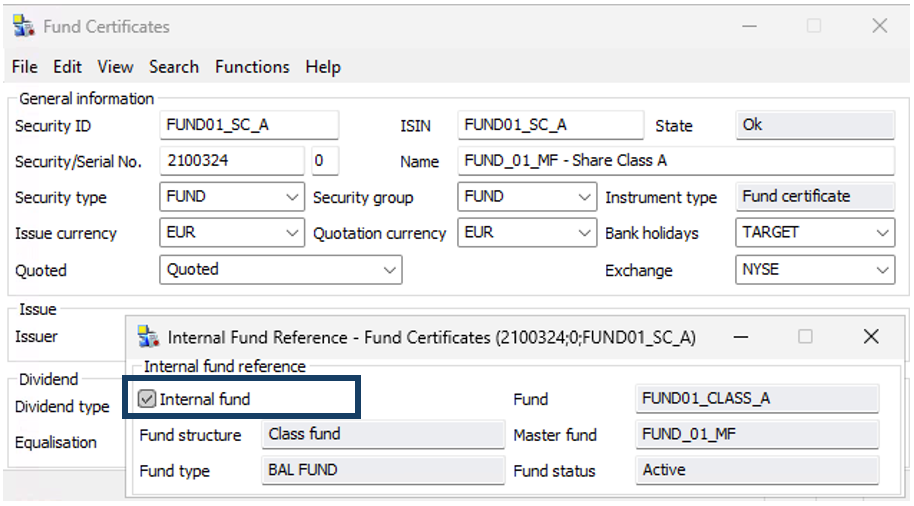
As of version 26.01, a fund certificate managed by a fund manager (internal) can be easily distinguished from a fund certificate that the fund manager invested in on the market (external).
A new sub-window in the Fund Certificate static data window, under Functions: Internal Fund Reference, shows if the Fund Certificate is referenced on an active Fund Definition (Check Box: Internal Fund) and some relevant info from this Fund Definition.
It is possible to filter fund certificates in the General Segments and Fund Administration Segments windows based on whether a fund is marked as Internal or not.
Benefits
Visualizes a referencing Fund Definition on Fund Certificate static data
Enables to distinguish internal Fund Certificates more easily in operational tasks and Fund Figure calculations.
Subscription based licensing
Investment Accounting Manager
Sales module dependency
Investment Accounting Manager
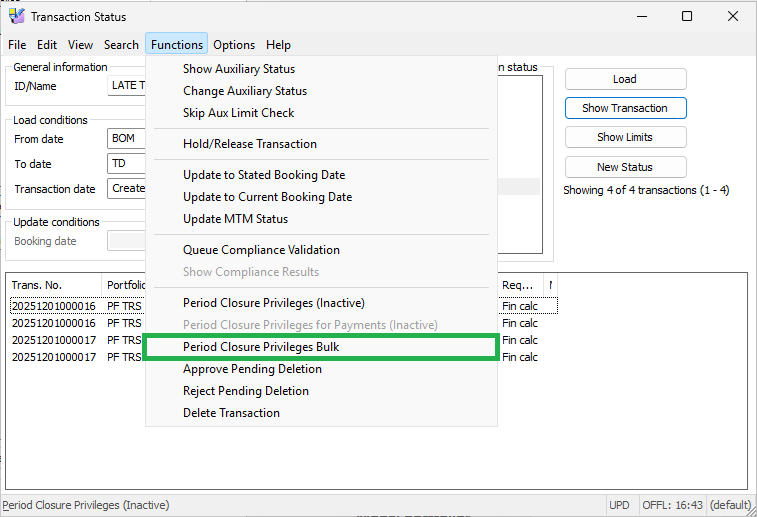
Bulk update of transactions period closure dates
Period closure functionality is great for fixing the period and if late information arrives everything is getting booked as first day of a new period. Sometimes due to late confirmations or errors found late, or change that is deemed material, after period is closed clients need to include corrections into closed period and redo end-of-month process, reporting, official figures, etc. With this enhancement it’s become possible to work with multiple transactions of different types from one screen, which gives huge efficiency boost for accounting/operations teams to work with such cut-off transactions.
Benefits
Significantly reduces time spent by accounting/operations teams on managing corrections during end-of-month processes
Simplifies process of moving transactions back into closed period, that reduces risk of having even more human errors
Allows users to scale and work with instruments that often get late confirmation (like alternatives) in combination with “Period closure functionality”
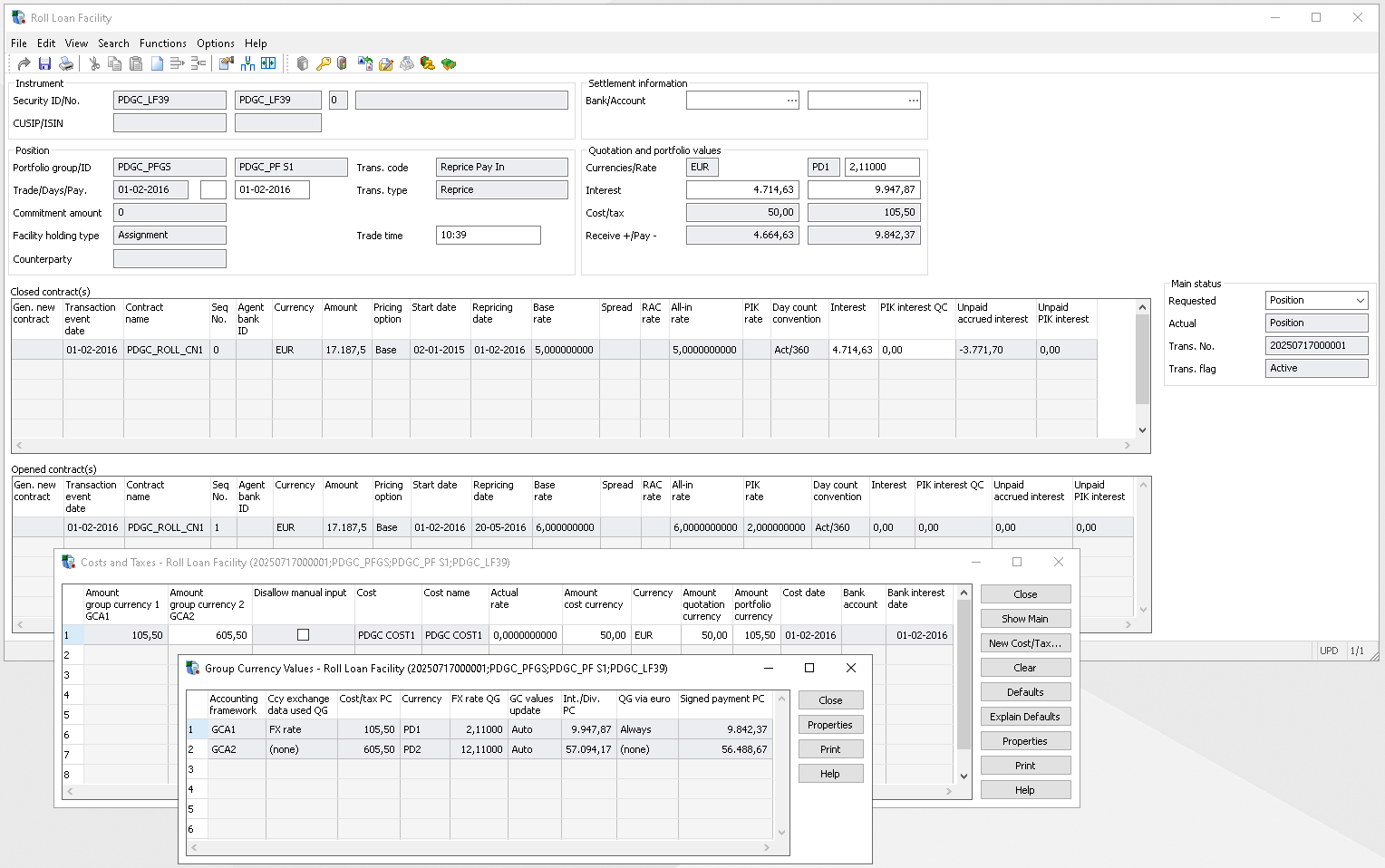
Gain Clarity and Control with the GCA Module for Loan Facilities To effectively monitor exposure in your accounting currency, it's essential to integrate your main investments into a unified financial view. Our Group Currency Accounting (GCA) module now includes loan facilities, ensuring your investment records are consistently aligned with your accounting standards.
Key Capabilities
Automatic Transaction Integration All transactions are seamlessly created within the GCA framework—once configured—ensuring consistency and eliminating manual errors.
Reliable Valuation GCA values are automatically calculated for each transaction and are protected from manual modification, guaranteeing data integrity.
Effortless Updates To retrieve GCA values, simply import new transactions or update the status to “Position” or higher—no extra steps required.
Benefits
Unified Investment Book Maintain your investment records in a consistent accounting currency across all asset classes.
Accurate Financial Metrics Track book value, cost, and P&L with precision in your chosen accounting currency.
Enhanced Exposure Management Monitor and manage currency exposure with confidence.
Informed Decision-Making Make strategic decisions based on accurate, real-time financial data.
Caption: Group currency accounting value for a Loan facility – Roll Loan & Costs and Taxes
Subscription based licensing
ABOR/ GCA Module
Sales module dependency
Group currency accounting
Release 25.07 ABOR
Group currency accounting for Loan facility
Gain Clarity and Control with the GCA Module for Loan Facilities To effectively monitor exposure in your accounting currency, it's essential to integrate your main investments into a unified financial view. Our Group Currency Accounting (GCA) module now includes loan facilities, ensuring your investment records are consistently aligned with your accounting standards.
Key Capabilities
Automatic Transaction Integration All transactions are seamlessly created within the GCA framework—once configured—ensuring consistency and eliminating manual errors.
Reliable Valuation GCA values are automatically calculated for each transaction and are protected from manual modification, guaranteeing data integrity.
Effortless Updates To retrieve GCA values, simply import new transactions or update the status to “Position” or higher—no extra steps required.
Benefits
Unified Investment Book Maintain your investment records in a consistent accounting currency across all asset classes.
Accurate Financial Metrics Track book value, cost, and P&L with precision in your chosen accounting currency.
Enhanced Exposure Management Monitor and manage currency exposure with confidence.
Informed Decision-Making Make strategic decisions based on accurate, real-time financial data.
Caption: Group currency accounting value for a Loan facility – Roll Loan & Costs and Taxes
Subscription based licensing
ABOR/ GCA Module
Sales module dependency
Group currency accounting
Release 25.01 ABOR
Restitutions on cross-currency corporate actions and reallocations
In most countries, taxes must be paid on income received from assets such as dividends and coupons. However, in some cases, investors are entitled to reimbursement or restitution of tax amount paid or receive restitution on the tax paid.
When accounting for restitutions and operating across various markets, investors can create reallocation transactions and cross-currency corporate actions. These transactions enable the transfer of restitution amounts from one position or lot to another and the conversion of these amounts into different currencies.
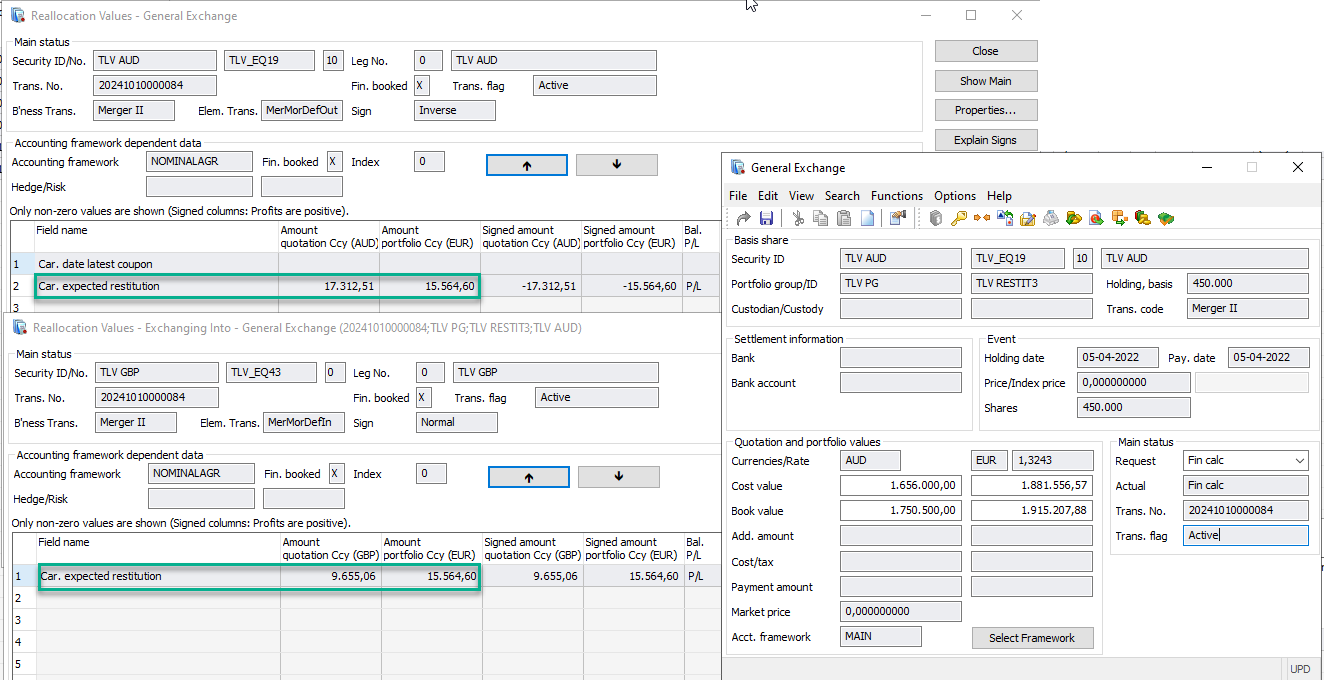
For those working with cross-currency corporate actions or reallocations, it is now possible to transfer expected restitution or expected restitution per dividend amounts from one position to another while simultaneously converting these restitution amounts from the currency of the initial position to that of the new position.
This functionality supports the following cross-currency events:
Partial portfolio and custody reallocations
Portfolio reallocations
Merger corporate action event types
Also, the solution ensures that restitution values are the same on the profit/loss and nominal levels.
Benefits
Enables users to move restitution balances to new positions during cross-currency corporate action events and reallocations, converting transferred values into the currency of the new lot/position;
Enhances accounting data by applying advanced logic for converting expected restitution values from the currency of out lot or position to the currency of in lot or position;
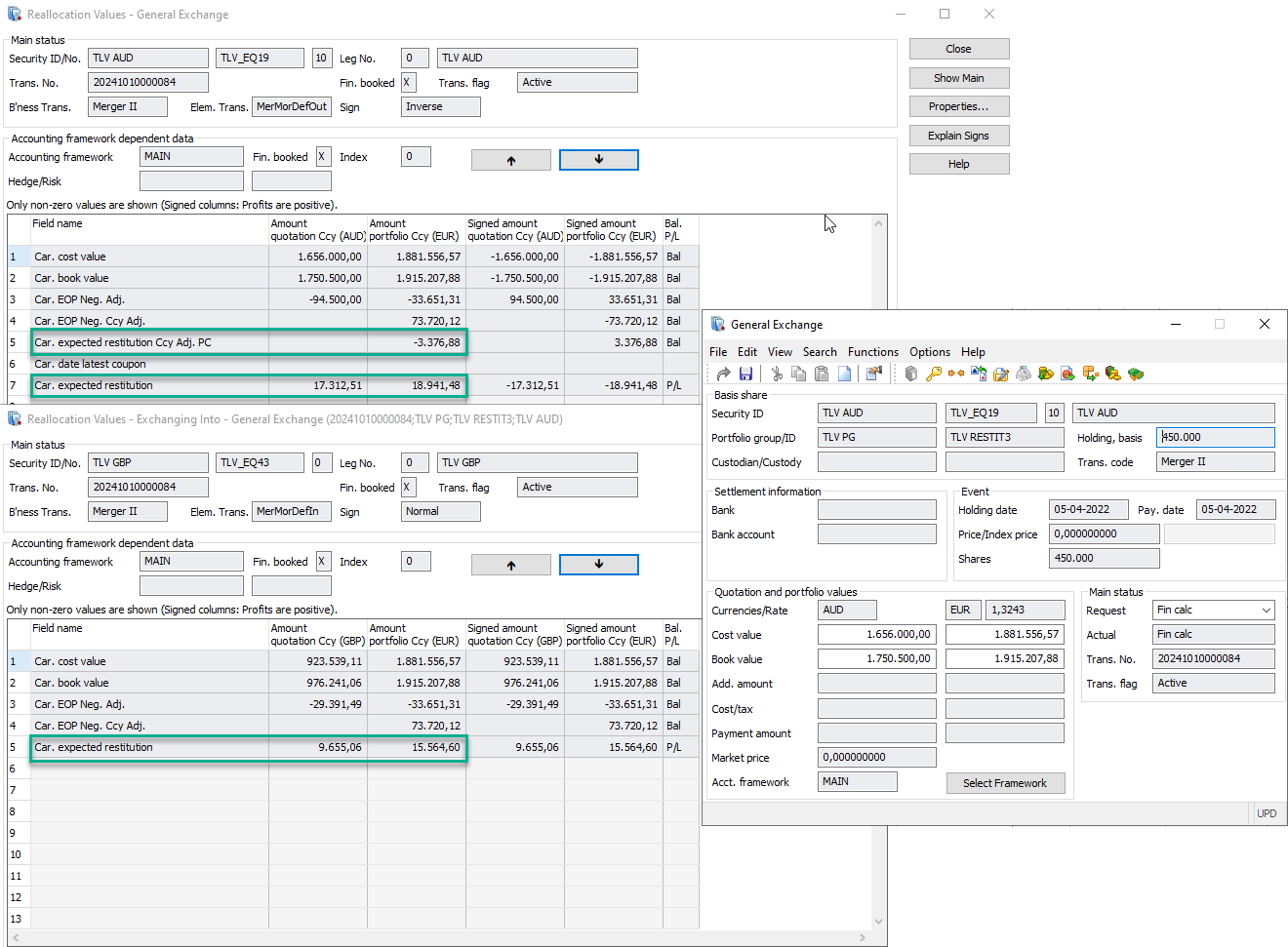
This image shows restitution amounts under the Reallocation values sub-window of the General Exchange transaction. Values are shown on Nominal framework.
This image shows restitution amounts under the Reallocation values sub-window of the General Exchange transaction. Values are shown in the Profit and loss framework.
Subscription based licensing
Investment Accounting Manager
Sales module dependency
Restitution/Coupon tax
Accrued interest per lot
The ultimate goal for many accounting clients in lot-level jurisdictions (e.g., those using FIFO method or manually matching lots), accurately calculating income per lot is crucial for regulation and tax purposes. Since accrued interest and coupons are components of income, they must be reported for each individual opening lot.
Benefits
Natively supports accrued interest and coupon attribution at the lot level
Facilitates more robust Data Warehouse reporting and regulatory reporting solutions based on native functionality per lot
Simplifies backtracking and ad hoc analysis of accrued interest GL figures and reporting numbers in SimCorp Dimension
Decreases maintenance time and risks associated with performing these calculations outside of SimCorp Dimension
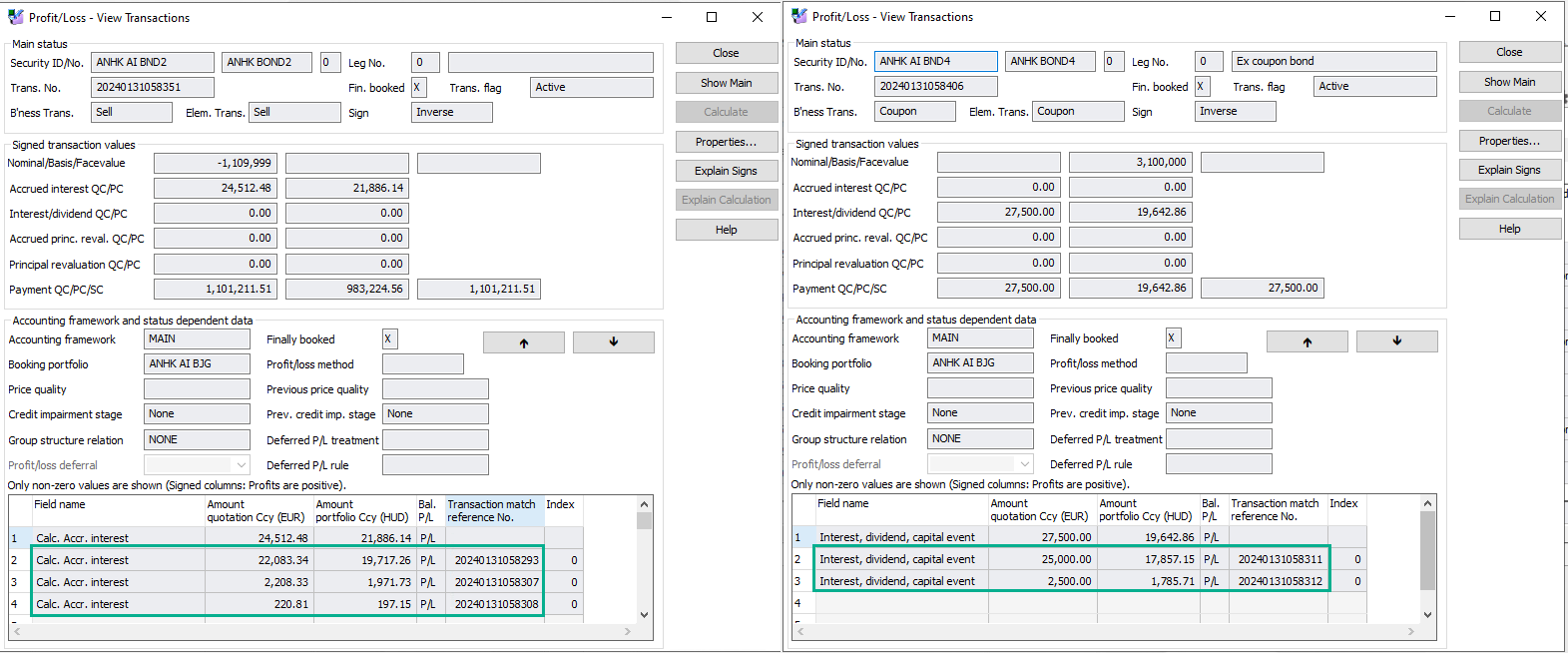
The new functionality enables native calculation of accrued interest and coupons on all relevant transactions, like buys, sells, adjustments, coupons, corporate actions, reallocations, and internal trades.
This image shows Profit/Loss view of accrued interest and coupon amounts per lot calculated on transactions.
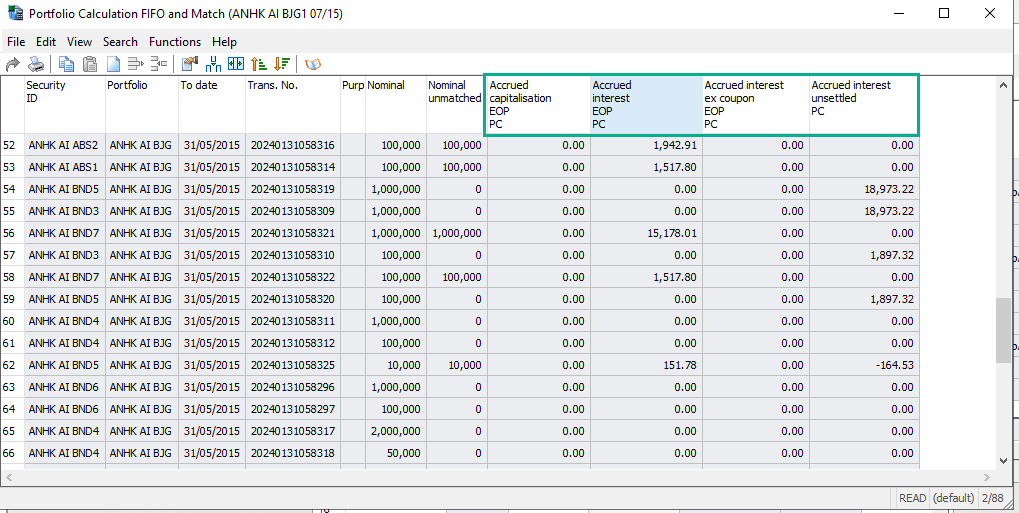
Lot level figures are available in portfolio calculation, which means easy access for this data for regulatory reporting and DWH reports.
This image shows Portfolio Calculation view of accrued interest amounts per lot.
Complex cases, like ex-coupon instruments, unsettled period accrued interest, and capitalization bonds, are also addressed with these enhancements as well.
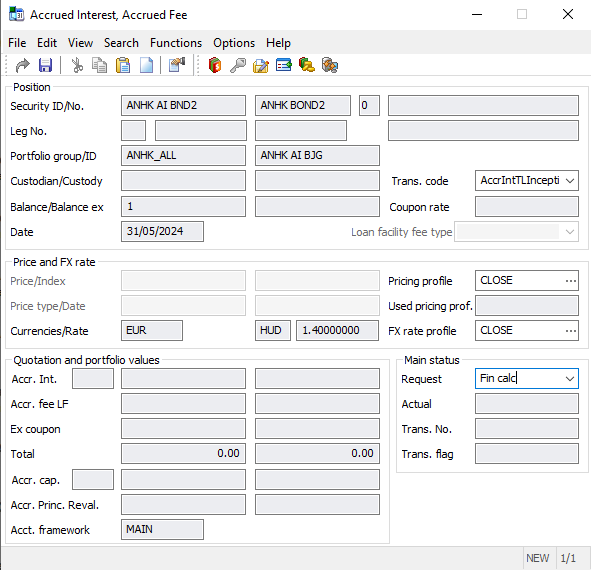
For existing clients already in production with active interest-bearing positions, there is an easy way to migrate to the new solution without the need for reallocations, rebooking, or reconfigurations (freezing holdings). The new process allows clients to pick a date for populating lot-level figures on transactions. A new transaction is needed to establish lot-level figures on holdings, but this process doesn’t disrupt ongoing operations or backdated changes. With this new process, the adoption of this enhancement is much easier and more straightforward and does not require a developer to perform this task.
This image shows accrued interest inception transaction that establishes accrued interest amounts per lot and going forward on transactions generated after this one, lot accrued interest amounts will be populated.